
Quick Summary: A Community Certificate (சாதிச்சான்றிதழ்) is an official Tamil Nadu government document that proves your caste/community. It is required for school admissions, government jobs, scholarships, and welfare schemes. You can apply online via TNeSevai / TNEGA portal or offline at your nearest Taluk office. Processing time: 7 to 30 days.
What is a Community Certificate? (சாதிச்சான்றிதழ் என்றால் என்ன?)
A Community Certificate is an official document issued by the Tamil Nadu Revenue Department that certifies the caste/community of an individual. It is commonly known as a Caste Certificate or Saadhi Certificate (சாதிச்சான்றிதழ்).
It is issued for the following communities in Tamil Nadu:
- BC – Backward Class
- MBC – Most Backward Class
- SC – Scheduled Caste
- ST – Scheduled Tribe
- FC/OC – Forward Class / Open Category (Note: OC community certificate is not issued online; contact your Taluk office directly)
When do you need a Community Certificate?
- School/ college admission for your child
- Applying for government jobs (TNPSC, TN Police, etc.)
- Scholarship applications
- Government welfare scheme benefits
- Higher education reservations
Two Ways to Apply for Community Certificate in Tamil Nadu
There are two methods to apply for a community certificate in Tamil Nadu:
- Online Method – via TNeSevai / TNEGA Citizen Portal (recommended)
- Offline Method – visit your nearest Taluk / eSevai office in person
Documents Required for Community Certificate in Tamil Nadu
Before you begin the application, keep these documents ready as scanned copies (JPG, PDF, PNG, or GIF format):
| Document | Purpose | Mandatory? |
|---|---|---|
| Passport-size Photo | Identity | Yes |
| Ration Card | Address proof | Yes |
| Community Certificate of Father/Mother | Community proof | Yes |
| School Transfer Certificate (TC) or School Certificate of Parents | Community/identity proof | Yes |
| Self Declaration Form (signed and scanned) | Applicant declaration | Yes |
| Aadhaar Card | CAN registration | Yes (for CAN) |
| School Leaving Certificate (SLC) | Additional proof | Optional |
Note on Self Declaration Form: The self-declaration form is auto-generated by the TNEGA portal when you complete your CAN registration. Download it, print it, sign it, scan the signed copy, and upload it during the application.
How to Apply Community Certificate Online in Tamil Nadu (Step-by-Step)
Follow these steps to apply for a community certificate through the TNeSevai / TNEGA Citizen Portal (REV-101):
Step 1: Register on the TNeSevai Citizen Portal

Visit https://www.tnesevai.tn.gov.in/Citizen/ and click “New User Sign Up here” below the login form. Fill in your name, mobile number, and email address to create your account.
Step 2: Create Your CAN Number (Citizen Account Number)
What is a CAN Number?
CAN stands for Citizen Account Number. It is a unique ID linked to your Aadhaar and mobile number that stores your personal details. You need a CAN to apply for any government certificate (community, income, nativity, etc.) through the TN e-Governance portal.
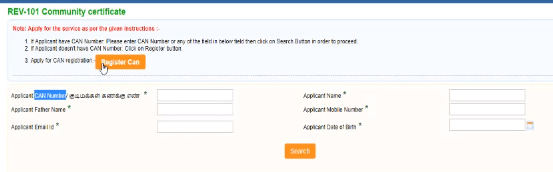
How to create a CAN Number:
- Log in to your account → Click Services in the sidebar
- Go to Department Wise → Revenue Department → REV-101 Community Certificate
- Click “Register CAN”
- Fill all personal details and verify with OTP sent to your mobile
Important: You can create multiple CAN numbers for different family members (spouse, children) under the same account. This is useful when applying for community certificates for your children.
Step 3: Fill the Online Community Certificate Application (REV-101)
- Log in → Click Services → Department Wise → Revenue Department → REV-101 Community Certificate

- On the Service Instructions page, click “Proceed”
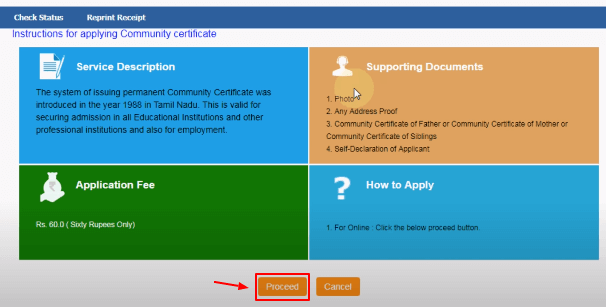
- Enter your registered mobile number, click Search, and select your name with CAN number
- Generate OTP, verify it, and click Proceed

- The form will be pre-filled with your CAN details — fill in the remaining required fields
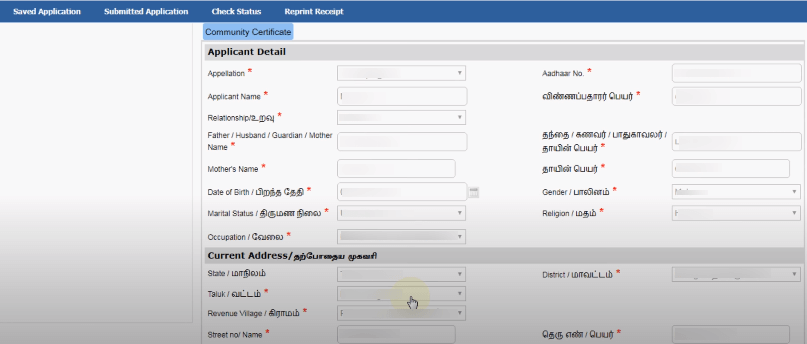
Step 4: Upload Required Documents

In the Document Upload section, upload scanned copies of:
- Passport-size photograph
- Address proof (Ration Card)
- Father’s/Mother’s community certificate (or siblings’ community certificate)
- Self Declaration Form (signed and scanned)
Accepted file formats: JPG, PDF, GIF, PNG
Step 5: Make Payment
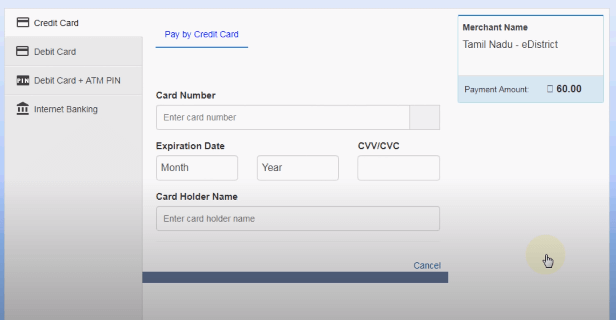
Click “Make Payment”. The application fee is Rs. 60/-. You can pay using Credit Card, Debit Card, or Internet Banking.
After successful payment, you will receive an Acknowledgement Number via SMS. The eSevai Center officer will also issue an Acknowledgement Receipt. Keep this number for status tracking.
How to Apply Community Certificate for a Child / Baby in Tamil Nadu
This is one of the most common questions parents ask. Here is a complete guide specific to getting a community certificate for your child (including newborns, toddlers, and school-going children).
Minimum Age for Community Certificate
There is no strict minimum age, but practically:
- Newborn / Infant (0–2 years): Not required immediately. Apply when school admission approaches.
- 3+ years: You can apply for a community certificate. Most parents apply at age 3 to get it ready before LKG/UKG admission.
- School students: A community certificate is mandatory for enrollment and scholarship benefits.
Documents Required for Child’s Community Certificate
| Document | Notes |
|---|---|
| Child’s Aadhaar Card | Required for CAN registration for the child. Apply for child Aadhaar first if not done (takes 7–10 days) |
| Child’s Birth Certificate | Proof of birth and age |
| Father’s Community Certificate | Most important document — child inherits community from father |
| Father’s School Transfer Certificate | If father has no community certificate, TC is accepted |
| Ration Card (Family) | Address proof |
| Child’s Passport Photo | Scanned copy |
| Self Declaration Form | For young children: write the child’s name in the signature field and proceed |
Steps to Apply Community Certificate for Child Online
- First, ensure your child has an Aadhaar card. If not, apply at your nearest Aadhaar centre.
- Log in to your existing TNeSevai account (parent’s account).
- Create a new CAN number for your child — go to Services → Register CAN → fill child’s details.
- Once CAN is created, proceed with the REV-101 application selecting your child’s CAN.
- Upload the required documents listed above.
- Pay the Rs. 60 fee and note the acknowledgement number.
Inter-caste marriage: If parents are from different castes, the child’s community certificate is typically issued based on the father’s community. Contact your local Tahsildar office for guidance in such cases.
How to Update Community Certificate in Tamil Nadu (Old to New Format)
The Tamil Nadu government has updated the community certificate format to a digital version with a photo. If you have an old community certificate (without photo) and want to update it to the new digital format, here is what you need to do:
Documents Required for Community Certificate Update
- Old community certificate (photocopy)
- Aadhaar card
- Passport-size photograph
- Ration card
- Self declaration form
Steps to Update Community Certificate
- Visit your nearest eSevai / TNeSevai centre or log in to tnesevai.tn.gov.in
- Select REV-101 Community Certificate service
- In the application, indicate it is an update/renewal and provide your old certificate details
- Upload all required documents
- Pay the fee and collect your new digitized community certificate
You can also visit the TNEGA citizen portal at tnega.tn.gov.in for digital certificate services.
Community Certificate Application Status Check
After applying for your community certificate, you can track the status in two ways:
Via SMS
Send an SMS to 155250:
Type your Acknowledgement Number and send it to 155250.
The first SMS is free. Subsequent SMSes are charged Rs. 1 per SMS by your telecom operator.
Via TNeSevai Portal
- Log in to your TNeSevai account
- Go to Services → Application Status
- Enter your acknowledgement number to check the current status
Processing time: Community certificates in Tamil Nadu are typically processed within 7 to 30 days from the date of application. Online applications through the TNEGA portal are usually faster (7–14 days).
Also Read: TNeSevai Status Check
Apply for Community Certificate Offline (In-Person)
If you prefer the offline method or face issues with the online portal:
- Download the application form: Community Certificate Application Form (PDF, 93.1 KB)
- Print and fill the form with all mandatory details
- Attach xerox copies of: Ration Card, School Leaving Certificate, Transfer Certificate, Parent’s Community Certificate
- Submit to your nearest Revenue Taluk Office or eSevai Centre
- Your certificate will be issued within 30 days
What is REV-101 Community Certificate?
REV-101 is the official service code used on the TNeSevai / TNEGA portal to identify the Community Certificate application service. “REV” stands for the Revenue Department, and “101” is the service number. When you navigate the portal, you will always find the community certificate service listed as REV-101 Community Certificate.
The REV-101 service allows you to apply for a new community certificate, update an existing one, or get a digitized copy of your old certificate.
Frequently Asked Questions (FAQ)
How many days does it take to get a community certificate in Tamil Nadu?
Online applications via TNEGA typically take 7 to 14 working days. Offline applications at Taluk offices may take up to 30 days. Track your application using the acknowledgement number via SMS to 155250.
Can I apply community certificate online for my child?
Yes. If your child is 3 years or older and has an Aadhaar card, you can apply online via the TNeSevai portal. Create a separate CAN for your child using your account, then submit the REV-101 application with your child’s CAN details.
What is a CAN number and how do I get one?
CAN stands for Citizen Account Number — a unique ID linked to your Aadhaar used for all Tamil Nadu e-governance services. You can create a CAN by logging into the TNEGA/TNeSevai portal → Services → Revenue Department → REV-101 → Register CAN. Fill your personal details and verify with OTP.
Where can I download the self-declaration form for community certificate?
The self-declaration form is auto-generated by the TNEGA portal when you complete your CAN registration. Go to your TNEGA account → download the self-declaration form → print it → sign it → scan the signed copy → upload it in the document section of the application.
Is community certificate available for OC (Open Category / Forward Class)?
The Tamil Nadu Revenue Department currently issues online community certificates for SC, ST, BC, and MBC communities. For OC (Forward Class / FC), the online option may show “Not Applicable.” OC individuals should contact their nearest Tahsildar office or eSevai centre directly for a manual certificate.
How to apply community certificate without parents’ community certificate?
If parents do not have a community certificate, you can use the school Transfer Certificate (TC) or School Leaving Certificate of the parents, which typically shows community details. In some cases, affidavits or a declaration from the Village Administrative Officer (VAO) may be accepted. Visit your Taluk office for guidance in such situations.
How to update community certificate to new digital format with photo?
Visit your nearest eSevai centre or apply through the TNeSevai portal using the REV-101 service. Carry your old community certificate, Aadhaar, Ration Card, and a passport photo. The updated digital certificate with your photo will be issued in 7–14 days.
Can I download my community certificate online in Tamil Nadu?
Yes. Once issued, you can download your community certificate from the TNEGA citizen portal (tnega.tn.gov.in) or the edistricts portal (edistricts.tn.gov.in) using your application/certificate number. You can also visit any eSevai centre to download a digitally signed copy.
What documents are required for community certificate update in Tamil Nadu?
For updating an old community certificate to the new digital format, you need: old community certificate (photocopy), Aadhaar card, passport-size photograph, Ration card, and signed self-declaration form.
how to do sign for applying 4 year old to get community certificate in online(Regarding self declaration)
For self-declaration sign just write a kid name and proceed. Make sure other documents are valid (photo, address proof, father community certificate) are more important for verification.
Hope you understand.
Am I applying community certificate for my 3 years old kid? Who’s name has to register in CAN application form either mine or my kid’s?
Dear Sabari, You can able to create a separate CAN for your kid.
I son do not have Aadhar till now. How to get CAN number for him without Aadhar? Can i apply for him with my CAN number? Plz confirm
Sir you can able to create multiple CAN for your family members through your account? If you face any issues kindly contact near by eSevai Office.
Can we apply community certificate for 1 year baby / is there any minimum age limit for community certificate application.
For 1 year kid you can not able get community certificate and that’s not a mandatory one until your kid will start Pre KG/LKG/UKG, schooling.
My kid is 3 years old and don’t have Aadhar card for him. Whether CAN number should be registered on his name or we can use our name? It is showing as Aadhar card is mandatory document for CAN registration.
When your kid complete 3 years means you can apply for separate aadhar card. It will take maximum 7 to 10 days to receive. After that apply for a community certificate with CAN Details with your own account.
Hi sir , I have applied community certificate for my daughter and age is complete 3 years after June 2023 only got any issue to get certificate?
No issues sir kindly proceed. you will get it immediately.
How many days will it take to get my community certificate?
It will take a maximum 7 to 14 days madam.
Why community certificates for OC are not available online
As per the TN Revenue Department the following categories of certificate only available right now.
1. SC/ST – Scheduled Caste, Scheduled Tribe
2. Other Backward Classes includes (MBC/BC)
st community not available
Hi viswa,
Kindly check with the portal again. Hope it’s available.
Else if you found any issues with online portal kindly check with nearby Tahsildar office eSevai centre along with required documents.
Where can we download the self declaration form ?
It was automatically generated while you completing the CAN Registration for any certificate in tnesevai portal. It contains your details such as name, address, etc… Once it generated just download the self-declaration form and put the sign and scan the signed document then upload it to documents.
If you face any trouble please watch this video about self declaration in tnesevai
Sir,
I and my husband are from different caste. My husband doesn’t have a community certificate, he has only his school transfer certificate. What to do? Please help me out.
Transfer certificate is enough to apply for the community certificate. If you face any issues with the online method you may contact your respective village administrative officer or taluk office.
Iam oc community and there is no caste options available there , it states not applicable.
what can i do?
Hi, Swathi Currently in Tamil there was only three categories of Community Certificate has been available (SC/ST, MBC & BC considered as OBC – Other Backward Class). So specifically there is no option for OC Category Community Certificate. If you want to know more about this we request to u kindly contact your near by Taluk Office. Thanks.
I AM NATIVE OF UDAMALPET OF TAMILNADU ,I AM WORKING IN KARNATAKA FOR THE PAST 30 YEARS AND I AM HAVING ADDRESS PROOF IN KARNATAKA .MY DAUGHTER BORN AT METUPALYAM IN COIAMBATORE DISTRICT .NOW I NEED COMMUNITY CERTIFICATE FOR MY DAUGHTER.KINDLY HELP ME TO GET THE SAME
I SIR, MY FATHAR COMMUNITY CERTIFICATE , TC NO MY MOTHER COMUNITY CERTIFICATR ,TC NO SO HOW TO APPLY WHICH DOCUMENT UPLODE IN COMMUNITY PROOF
hello sir,i applied for community certificate but the application returned to citizen in remarks they asked for self declaration form i attached signature for that so the application returned to me how to download the self declaration form for already submited application form.
Hi Ramya, Just check the image https://pasteboard.co/m4TzBoQO6Wxw.png
1. Download the self-declaration form
2. Then put your signature then scan the signed document.
3. Upload the scanned document and make payment.
For applying kid community certificate should I upload my son pic for photo?
No Poornima. Photo not required.
I m applying community certificate for my 3year old daughter how to sign self Declaration form
Sir , I am about to apply community certificate for my 4 year old son . We are intercaste marriage , we both have decided to use mother caste for community certificate . Will there be any challenges while applying through online
It will not be an issue. You just specify the details of the caste in the section “Requested Caste” and attach CC and other documents of the mother.
Team, you are doing wonderful job. Thanks for your great support
in the self declaration form the name in tamil is misspelt but the English one is correct. what to do in this case